

The Bottom Line: At catalog scale, translation stops being a content task and becomes a data pipeline: the only way to localize thousands of SKUs without breaking your store is to use a structure-preserving CSV engine that enforces your brand glossary across every single row.
Most e-commerce teams hit the same wall around the same SKU count. Up to a few hundred products, you can muscle through with a freelancer, a translation agency, or a brave intern. Past that, the math falls apart. A 10,000-SKU catalog, refreshed monthly, going into 5 languages is not a translation project anymore. It is a recurring localization workload that your current process was never designed to handle.
With global ecommerce sales forecast to reach $6.88 trillion in 2026 (Shopify), and 76% of online shoppers preferring to buy products with information in their native language (CSA), catalog translation now sits on the revenue side of the ledger, not the cost side.
This guide is about that workload. We will cover how to move from one-off catalog translation to a repeatable, AI-powered CSV pipeline that keeps your product data clean, your brand voice consistent, and your import files unbroken. If you are still at the smaller end of this and want the tactical playbook, start with our step-by-step product catalog CSV guide and come back here when scale becomes the bottleneck.
What “at scale” actually means for a product catalog
Scale in localization is rarely just about SKU count. It is the combination of four pressures stacking up at the same time.
Volume. Catalogs above roughly 1,000 SKUs already have enough text to make manual translation prohibitively expensive. By the time you cross 10,000 SKUs, you are looking at hundreds of thousands of words per language.
Velocity. Most stores do not freeze their catalog. New collections, seasonal drops, and supplier changes mean a steady stream of updates. If your translation workflow takes three weeks, your French store is permanently out of date, and each update should only translate the rows that actually changed, not the whole catalog again.
Variants. Sizes, colors, materials, bundles. Each one multiplies the number of rows in your export, even if the translatable text is concentrated in a few parent fields.
Languages. A 5,000-product catalog in 1 language is one job. The same catalog in 6 languages is six jobs that need to stay synchronized as the master catalog evolves.
Any of these alone is manageable. All four together, on the same calendar, is what separates “we localized our store last summer” from “we run a multilingual store every day.” With more than 3 billion people expected to buy online in 2025 (Shopify) and 73% of consumers wanting product reviews in their language “if nothing else” (CSA), the stakes for e-commerce localization have never been higher. For a wider view of the strategic stakes, see why website translation is important and the benefits of multilingual SEO. This is why specialized marketplace listing translation is becoming a core competency for global brands.
Why traditional approaches break at scale
Before getting into the AI-powered workflow, it is worth being honest about what does not work once you cross the scale threshold.
Freelance translators per SKU. High quality, painfully slow, and very expensive. A freelancer at €0.08 per word will quote you tens of thousands of euros for a mid-size catalog and need weeks to deliver. Fine for hero pages, unworkable for an entire long tail.
Generic AI chat tools. ChatGPT and Claude are excellent language models, but they were not built to ingest structured CSV files. They lose row alignment on long files, drop columns, mangle HTML, and forget your glossary halfway through. We dug into this in why you should not use ChatGPT or Claude to translate CSVs.
Translation widgets on the storefront. Tools that auto-translate the rendered page leave your underlying product data in one language. SEO suffers, exports stay monolingual, and you cannot edit the translation without reverse-engineering the widget.
Spreadsheet copy-paste. A surprisingly common pattern, and a surprisingly fragile one. Hidden costs include row drift, accidentally translated SKUs, and the slow erosion of brand terminology across batches. We covered this in detail in the hidden cost of translating spreadsheets with AI.
The common thread: each of these treats catalog translation as a content task. At scale, content is the easy part. The hard part is keeping the data structure intact and the terminology consistent across millions of cells.
The shift: from translation project to translation pipeline
The mental model that actually works at scale is borrowed from data engineering: build a pipeline, not a project.
A pipeline has a fixed input format, a fixed transformation step, a fixed output format, and runs on a schedule. You design it once, then feed batches through it forever. That is exactly what AI Glot is built to be for product catalog CSVs.
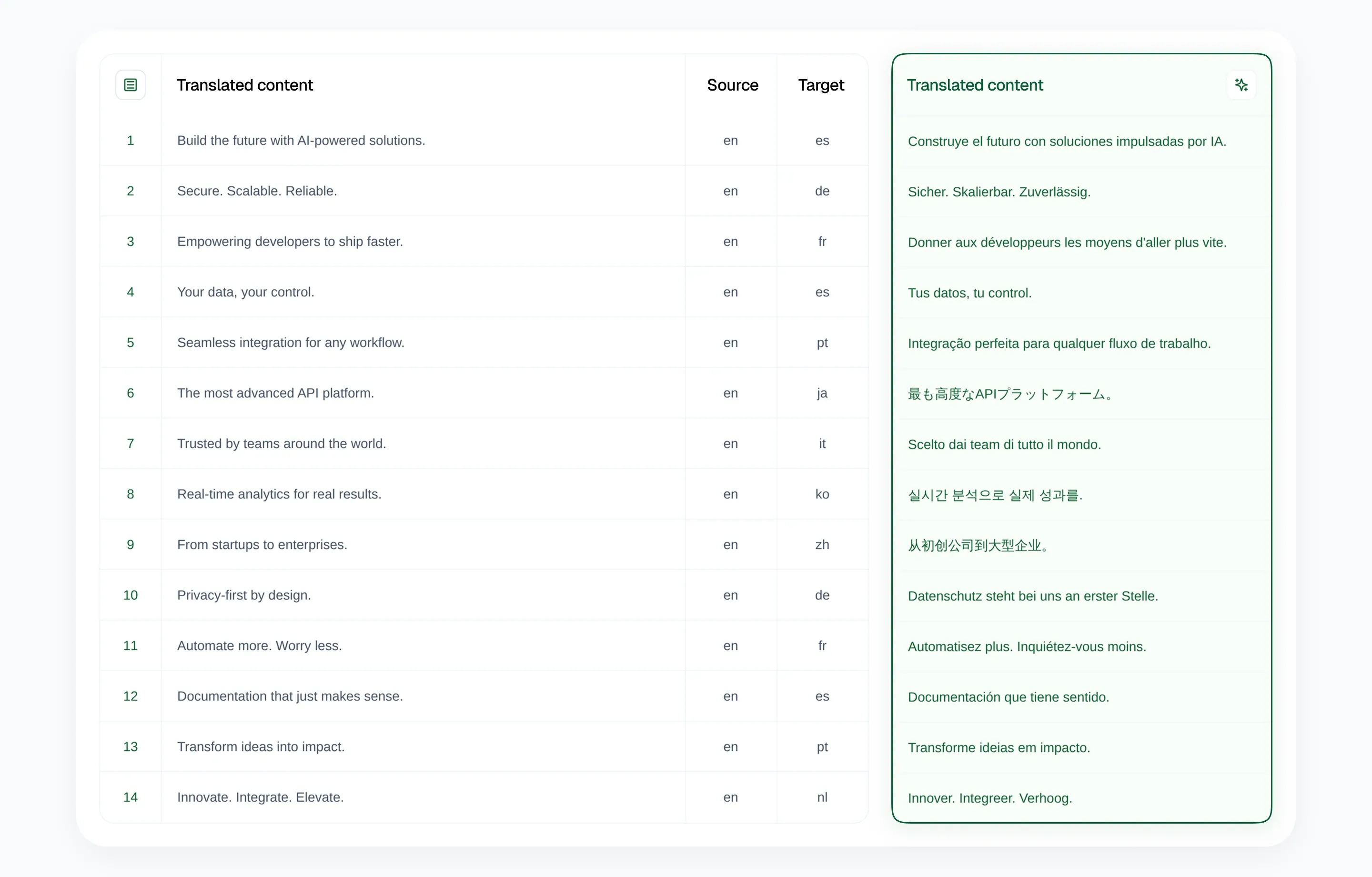
The platform sits between your e-commerce backend and your localized store. You export a CSV, the pipeline transforms it, you re-import it. The transformation is structure-preserving, glossary-enforced AI translation that only touches the columns you whitelist. Everything else, including SKUs, prices, slugs, and image URLs, passes through untouched.
This framing matters because it changes what you optimize for. Instead of asking “how do I translate this catalog once,” you start asking “how do I make this catalog easy to translate every month.”
The five-step pipeline for catalog scale
Here is the operating model we see working consistently across Shopify, WooCommerce, and custom e-commerce stacks. It maps cleanly to how AI Glot works and is designed to be repeatable, not heroic.
Step 1: Standardize your export
The pipeline starts at your e-commerce platform. Your goal is to make the export shape boringly predictable so every run uses the same instruction.
For Shopify, that means Products > Export > All products > CSV for Excel/Numbers. For WooCommerce, lock in a single export plugin and a single field set (we lean on WP All Export). For custom platforms, write a small export script that always produces the same columns in the same order.
If your catalog crosses 5,000 SKUs, segment exports by collection, brand, or product type. Smaller batches are easier to QA and let you parallelize across languages without one giant file becoming the bottleneck.
Step 2: Upload and write one clear instruction
Upload your CSV to AI Glot. The platform analyzes the file structure automatically and surfaces detected columns, sample rows, and word counts so you can sanity-check the export before spending a single credit.
For product catalogs at scale, write one plain-English instruction and reuse it every run. Name the columns to translate (Title, Body HTML, SEO Title, SEO Description, sometimes Tags) and every other column stays physically untouched. Read more about how CSV translation works if you want the longer breakdown.
The reason this matters at scale: with thousands of rows flowing through the pipeline every month, you cannot afford a single accidental SKU rewrite. Naming the exact columns to translate makes that class of error structurally impossible, and the plan AI Glot shows before it runs lets you confirm it.
Step 3: Build a glossary that compounds
At small scale, glossaries are nice to have. At catalog scale, they are the single biggest quality lever you have.
Set up glossary entries in your AI Glot workspace for:
- Brand and product line names that must stay verbatim (“BrandCo”, “AirFlow Series”, “FlexPro”).
- Technical units and abbreviations that should not be localized (“mAh”, “lumens”, “GSM”).
- Material and category vocabulary where you have a house style (“vegan leather” rather than “faux leather”, “loungewear” rather than “homewear”).
- Recurring marketing phrases that appear across many product descriptions and should sound the same every time.
A 30 to 60 entry glossary, built once and refined over a few cycles, produces translations that read like the same brand wrote them, even across 8,000 products and 5 languages. That consistency is what generic AI tools cannot deliver, and it is what your customers actually feel when they browse the localized site.
Step 4: Estimate before you launch
AI Glot shows you the total word count and credit cost before you commit to translation. At catalog scale, this preview step is non-negotiable.
A typical estimation looks like this for a 5,000-SKU catalog:
- Title plus Body HTML plus SEO fields, averaging 80 words per product.
- Total word count: roughly 400,000 words per language.
- One language in Standard mode: 400,000 credits.
- Five languages from the same source: 2,000,000 credits.
That maps cleanly to Pro or Business plan budgets, or to credit packs if you prefer pay-as-you-go. The point is that you see the bill before you sign for it, which is impossible when you are looping a catalog through ChatGPT prompt by prompt.
Step 5: Translate, sample, re-import
Launch the batch and let the pipeline run. For larger catalogs you can step away; AI Glot processes the file in the background and notifies you when the localized CSV is ready.
Once the file is done, do not skip the QA step, even if the temptation at scale is huge. A lightweight sampling strategy is enough:
- Open the localized CSV in a spreadsheet tool.
- Spot-check 20 to 30 rows spread across product categories.
- Confirm that SKUs, prices, handles, and image URLs are byte-identical to the source.
- Confirm that glossary terms came through correctly.
- Read 5 to 10 product descriptions end to end for tone and fluency.
That is usually 15 to 30 minutes for a 5,000-product catalog and it catches the rare edge cases (truncated HTML, locale-specific formatting) before they reach your store.
When the sample looks good, re-import the CSV through your platform’s standard product import. The full import-to-store loop is covered in our Shopify multilingual store guide.
Operating the pipeline week after week
The single biggest time-saver at scale is realizing you almost never need to retranslate the full catalog. You only need to translate the delta.
Most stores have three recurring sources of catalog change:
- Net new SKUs added by merchandising or new supplier integrations.
- Description rewrites on existing SKUs, typically driven by SEO or A/B testing.
- Seasonal or campaign content layered on top of the base catalog.
For each of these, export only the rows that changed, run them through AI Glot with the same instruction and the same glossary, and re-import the resulting CSV. The whole loop, end to end, can fit inside a 30-minute weekly slot once the pipeline is set up.
For the SEO side of these updates, our SEO website translation guide and multilingual SEO best practices are the right next reads. Title and meta description quality is where catalog-scale localization either wins or quietly loses traffic.
Common pitfalls at catalog scale
A few traps come up often enough that they are worth flagging up front.
Translating from a translation. If you generate German from English, then try to generate Italian from the German file, quality decays fast. Always run each language from the original source CSV. The cost difference is negligible, the quality difference is large.
Glossary drift. Glossaries that no one owns rot quickly. Assign one person on the localization or merchandising team to review the glossary once a quarter and add new brand terms as the catalog evolves.
Changing your instruction mid-pipeline. Naming specific columns for some batches and asking for the whole file on others is a great way to accidentally translate a column you meant to protect. Pick one instruction for each pipeline and document it.
Skipping the sample QA. It feels safe to skip when the previous 12 batches were clean. The 13th batch is where the surprise hides. A 20-row sample takes 10 minutes and is the cheapest insurance you will ever buy. We compiled the most expensive of these in CSV translation mistakes that break your import.
The bottom line
Catalog translation at scale is not a copywriting problem. It is a structured-data problem dressed up as content, and the teams that win are the ones who set up a boringly reliable pipeline instead of a heroic translation project.
The recipe is consistent: standardize your export, write one clear instruction naming your columns, invest 30 minutes in a real glossary, estimate before you launch, sample-QA the output, and treat ongoing updates as small deltas rather than full reruns. Do that, and a 10,000-SKU catalog across 5 languages stops being a quarterly fire drill and turns into a weekly checklist item.
Ready to put your catalog on a translation pipeline? Sign up to AI Glot, upload one collection as a test batch, and see how this workflow feels on real product data before scaling it across your full store.