
The Bottom Line: Shopify Markets provides the infrastructure for multi-currency and subdirectories, but its native “Translate & Adapt” app is too slow for large catalogs: the most scalable workflow is to export your product data as a CSV and use a specialized engine like AI Glot to localize descriptions in bulk without breaking your SKUs or handles.
If you are launching your Shopify store in a new country, you have two distinct problems to solve: how to set up the infrastructure, and how to actually translate the thousands of words in your catalog.
Shopify has made the infrastructure part surprisingly easy over the last few years. The translation part? That is still where most merchants get stuck.
When a store has 10 products, you can translate them manually in an afternoon. When a store has 500 products with detailed HTML descriptions, manual translation becomes a multi-week bottleneck that delays your international launch.
This guide will break down the exact landscape of Shopify localization. We will look at the native tools Shopify provides, where they fall short, and the CSV workaround that high-volume merchants use to translate catalogs at scale.
Part 1: The Infrastructure (Shopify Markets)
Before you translate a single word, you need to tell Shopify that your store operates in multiple languages.
Shopify handles this through Shopify Markets. This is the native infrastructure that allows you to sell globally from a single store. Through Markets, you can configure specific regions, set local currencies, and crucially, enable multiple languages.
Once a language is added to a Market, Shopify automatically creates subfolders for your URLs (e.g., yourstore.com/fr/ for French). It also automatically adds the correct hreflang tags to your code, which tells Google to show the French version to French searchers.
The infrastructure is solid. But adding a language in Shopify Markets does not automatically translate your content. It just creates the empty buckets waiting to be filled.
Part 2: The Translation Apps Landscape
To fill those buckets, you need an app. Shopify provides their own free solution, and there is a massive ecosystem of third-party alternatives.
The Native Route: Shopify Translate & Adapt
Shopify’s official app is called Translate & Adapt. It is free, and it integrates directly into your admin panel.
It provides two main features:
- A side-by-side editor where you can manually type translations for products, collections, and theme text.
- An auto-translate button powered by Google Translate.
The Reality Check: The auto-translate feature is limited to 2 languages and can feel robotic. More importantly, the side-by-side editor is a manual interface. If you have 500 products, you have to click into 500 individual screens to review or update the translations. It is functional, but it does not scale well.
The Third-Party Route: Proxy Apps (Weglot, Langify)
The most popular alternative is using a robust third-party app like Weglot. These apps operate differently. They scan your published website, translate the content using a mix of machine translation and human review, and serve the translated version over a proxy layer.
The Reality Check: These tools are incredibly fast to set up. However, they come with recurring monthly subscription fees based on your word count and pageviews. For stores with massive, constantly changing catalogs, those costs scale up quickly. Furthermore, you do not technically “own” the translated data within your Shopify database; it lives in the app’s layer.
Part 3: The CSV Gap (And how to solve it)
Here is the situation most mid-market merchants find themselves in: They want the translations to live natively inside their Shopify database (so they don’t have to pay a perpetual proxy app subscription), but they refuse to manually click through 500 products in the Translate & Adapt app.
The solution is Bulk CSV Translation.
If you export your product catalog from Shopify, you get a massive spreadsheet containing every piece of data about your store. If you can translate the text in that spreadsheet and re-import it, Shopify updates your entire catalog instantly.
The problem? You cannot just give a Shopify CSV to a translator or paste it into ChatGPT.
A Shopify CSV is highly structured. It contains Handles (URLs), Variant SKUs, Image Src links, and Prices. If a translator accidentally alters the Handle column, or if a generic AI chat tool decides to skip a row or change the formatting, the import will fail. Worst case scenario, it corrupts your inventory data.
The AI Glot Workaround
To translate a Shopify CSV safely, you must isolate the content from the structure. This is the exact problem AI Glot was built to solve.
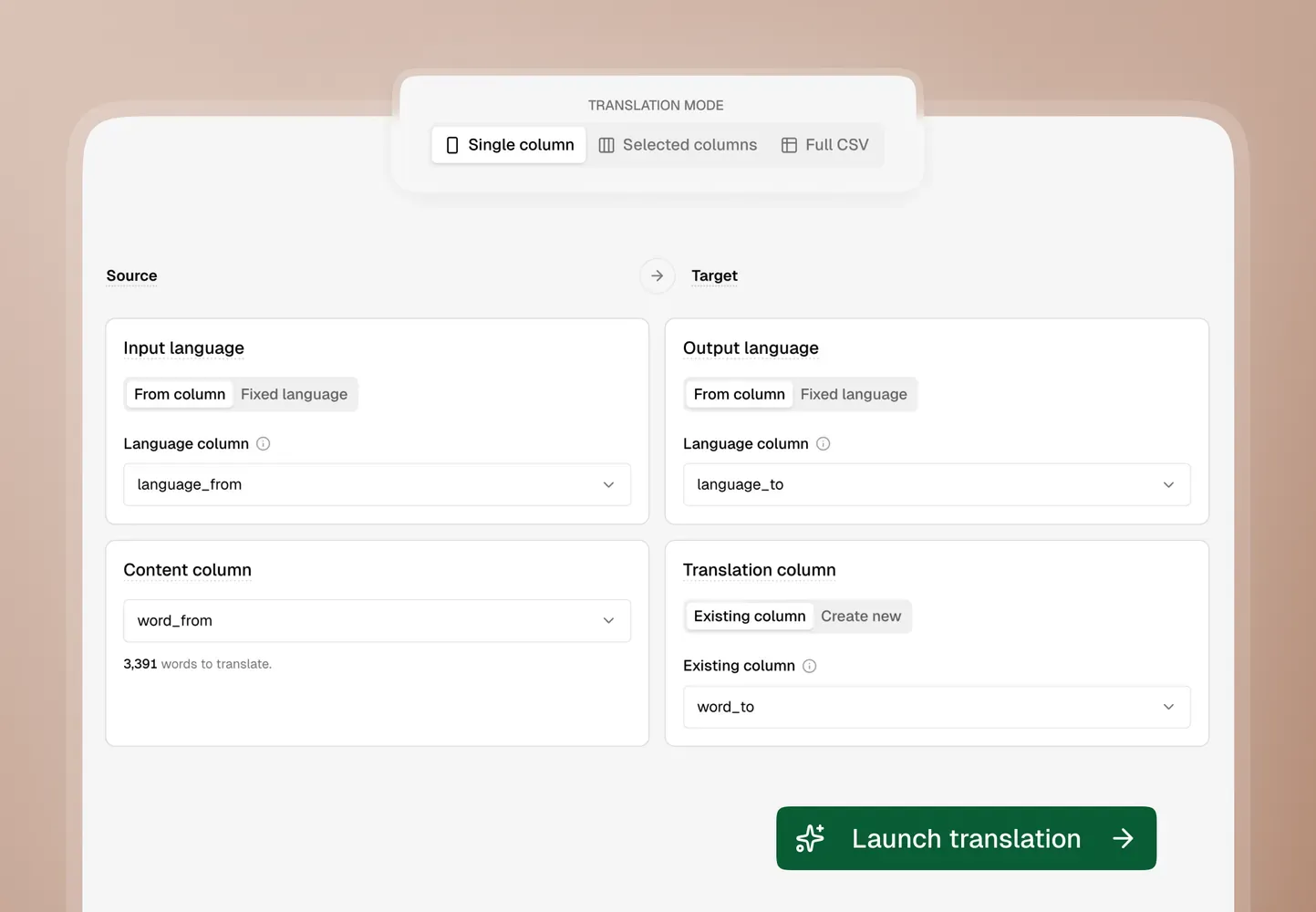
Instead of translating the entire file, you use AI Glot’s Selected Columns mode to create strict boundaries.
Here is the workflow:
- Export your products from Shopify via CSV.
- Upload the file to AI Glot.
- Map the columns. You tell the AI to translate the
Title,Body (HTML), andSEO Description. - Skip the structure. You explicitly instruct the engine to ignore
Handle,Vendor,Variant Price, andImage Src. - Enforce your brand. Add terms to the Glossary (e.g., ensure “Premium Flex Fabric” is never translated literally).
- Translate and Re-import.
Because the structural columns are physically excluded from the translation process, your Handles and SKUs remain completely untouched. The file imports back into Shopify flawlessly.
The Bottom Line
Making a Shopify store multilingual requires you to choose your operational tradeoff.
If you have a tiny catalog, use Shopify’s free Translate & Adapt app and do it manually. If you want zero technical involvement and don’t mind a high recurring monthly fee, install a Proxy app.
But if you want to localize hundreds or thousands of products quickly, cost-effectively, and keep the data natively inside Shopify, bulk CSV translation is your best path forward.
For a deep dive into the exact technical steps, read our complete guide on How to translate a Shopify product export CSV.