Authentication and scopes
Authenticate AI Glot API requests with workspace keys or OAuth tokens, choose minimum scopes and rotate credentials without exposing secrets.
Send a workspace API key or OAuth access token as a bearer credential:
Authorization: Bearer aig_live_••••••••Never place a credential in a query string. URLs are copied into logs, browser history and referrer headers.
Workspace API keys
An admin creates keys in Developer tools. The complete secret is shown once; AI Glot stores only a protected hash. Up to 10 keys may be active in a workspace.
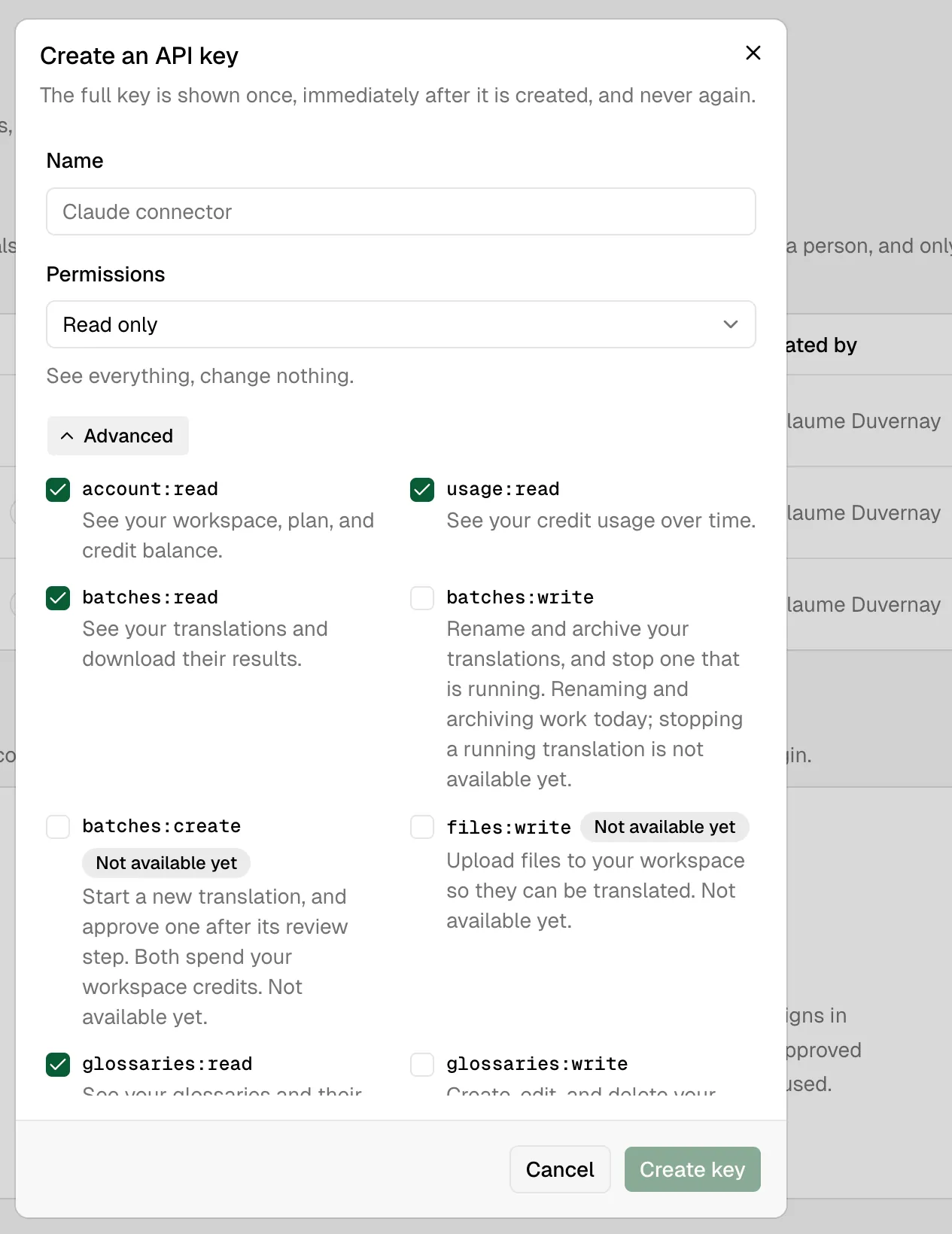
Use a separate named key for each integration.
Rotating a key
The key list offers a Rotate action. It issues a replacement with the same name, scopes and expiry, then revokes the original in the same operation. The old key stops working immediately, is marked replaced rather than plainly revoked, and records which key succeeded it.
That is deliberate: you rotate because a secret may be compromised, and a key that keeps working for another hour keeps working for whoever took it. For a planned, zero-downtime handover, create a second key instead, move the integration onto it, confirm the old key is quiet, then revoke it.
OAuth tokens
The CLI and compatible MCP clients can use OAuth 2.1. OAuth is recommended for a person because the connection records who approved it and respects that member’s access ceiling. API keys remain the right fit for CI and backend services.
Scopes
These scopes work today:
| Scope | Allows |
|---|---|
account:read | Workspace identity, plan, capabilities, limits and credit summary |
usage:read | Usage totals and time buckets |
batches:read | List translations, inspect progress and download completed results |
batches:create | Create a translation, plan it and approve it. Approval spends workspace credits |
batches:write | Rename and archive translations, and cancel one that is running. Cancelling charges for the work already completed |
glossaries:read | List and retrieve glossaries |
glossaries:write | Create, update, replace or delete glossaries |
A missing scope returns 403 insufficient_scope.
Reserved scopes
Two more scopes can be granted today but no endpoint honours them yet. They appear on the OAuth consent screen and in the dashboard’s Full access preset, so they are documented here rather than hidden: a permission you are asked to approve should always be findable in the reference.
| Scope | Will allow | Status |
|---|---|---|
files:write | Upload files to the workspace as a separate step, rather than sending them with the create call | Not available yet |
webhooks:write | Create, edit and delete the webhooks that notify your systems when work finishes | Not available yet |
They exist early so that a credential granted now keeps working the day the capability ships, without a second approval round. Read capabilities on GET /v1/account rather than the granted scopes to decide what a credential can actually do. A scope can be held before the endpoint behind it exists.
Member ceiling
Workspace admins can limit developer access for members. An OAuth client receives the intersection of what it requested and what the approving member may use. Reconnecting with a broader request cannot bypass a read-only ceiling.
batches:create is excluded from the default member ceiling. Every other scope is granted to a member’s connection out of the box; the one that spends credits is not. An agent looping with a delegated credential could otherwise consume a whole month’s allowance before anyone noticed, and credits cannot be un-spent. A workspace admin widens the ceiling deliberately when agent-initiated translation is wanted.