

The Bottom Line: a multilingual Astro site is a structural problem before it is a translation problem. Set up clean per-locale content folders, extract every translatable chunk into one CSV, ask AI Glot in one sentence to fill every language column, using AI Glot’s CSV translation, then reassemble the files programmatically. Once the pipeline is in place, adding a new language is a one-CSV operation.
This is the exact workflow we use to maintain ai-glot.com in six languages (English, French, German, Spanish, Italian, Portuguese) without rewriting a single blog post by hand. We will walk through it end-to-end, with the prompts we use to scaffold each step with an AI coding assistant like Claude Code or Cursor.
The objective
By the end of this guide you will have:
- A clean i18n routing structure in your Astro project, with one folder per language.
- A repeatable script that extracts every translatable string from a markdown file (or a CMS export) into a single CSV.
- A translated CSV produced in AI Glot, filled in one pass across every language column.
- A second script that reassembles the translated markdown files, with image paths and internal links corrected for the localized subdirectories.
- A skill file you can hand to your AI assistant so every new article ships translatable-by-default.
If you already have Weglot, Crowdin, or a headless CMS that exports CSV, you can skip the markdown extraction script and feed those exports directly into AI Glot. The translation and reassembly logic is the same for any CMS content translation project.
Prerequisites
A short checklist before you start.
- An Astro project (v4 or v5) running locally, with content collections set up for your blog.
- Node 20 or higher, so the modern CSV and
fs/promisesAPIs work cleanly. - An AI Glot account (free tier is enough for the first batch).
- An AI assistant in your editor for generating the boilerplate (Claude Code, Cursor, Copilot, Codeium, take your pick).
Why Astro is a great fit for multilingual at scale
Astro renders static HTML by default, which means each localized page is just a file on disk. There is no runtime translation layer, no language-switcher database lookup, no JavaScript bundle to download per locale. Google indexes each language version as a distinct URL with its own meta tags, and the build output is essentially a translated mirror of your English tree.
This is exactly what you want for SEO. Multilingual SEO works best when each language has its own crawlable, statically generated page, with proper hreflang annotations and a clean URL structure. Astro gives you that for free.
The tradeoff: you are responsible for keeping the content files in sync across languages. That is precisely the problem the CSV pipeline below solves.
Part 1: Set up the i18n routing structure
Astro 4 introduced first-class i18n config. The cleanest pattern is to declare your locales, set the default to no prefix (so English lives at /blog/my-post and French at /fr/blog/my-post), and mirror your content collections into a [lang]/ folder per language.
Here is a target structure for a blog with six languages:
src/
  content/
    blog/
      live/                          # English (default locale)
        my-first-post.md
      fr/live/                       # French
        my-first-post.md
      de/live/                       # German
        my-first-post.md
      es/live/                       # Spanish
        my-first-post.md
      it/live/                       # Italian
        my-first-post.md
      pt/live/                       # Portuguese
        my-first-post.md
  pages/
    blog/[slug].astro                # English routes
    [lang]/blog/[slug].astro         # Localized routes
  i18n/
    ui.ts                            # UI string dictionary per locale
Notice the localized markdown files sit one folder deeper than the English ones. That depth matters: relative image paths in localized markdown need an extra ../ to reach src/assets/. The reassembly script in Part 4 handles this automatically.
If you would rather not write this scaffold yourself, hand the following prompt to your AI coding assistant. It is intentionally generic so it works on any Astro project, and it asks the right clarifying questions before generating code.
You are helping me scaffold internationalization (i18n) in an existing Astro
project. I want to translate my entire site into multiple languages while
keeping clean URLs, proper hreflang annotations, and per-locale static pages.

Goals:
1. Declare locales in astro.config.mjs using the built-in `i18n` option.
   Default locale should NOT be prefixed (e.g. English lives at `/blog/...`,
   French at `/fr/blog/...`).
2. Create a per-locale folder structure for my content collections so each
   blog post (or CMS item) has a 1:1 file per language. The English files
   stay at their current location; localized files live one folder deeper
   (e.g. `src/content/blog/fr/live/`).
3. Add a typed UI string dictionary at `src/i18n/ui.ts` that exports an object
   keyed by locale, plus a `useTranslations(lang)` helper.
4. Update the content collection schema so the same Zod definition applies to
   every language folder.
5. Generate the dynamic route file `src/pages/[lang]/blog/[slug].astro` that
   reads from the localized content collection and falls back to English when
   a localized version is missing.
6. Add a `<LanguageSwitcher />` component that renders an anchor per locale,
   preserving the current pathname.
7. Inject `<link rel="alternate" hreflang="..." />` tags into the layout for
   every locale that has the page available.

Before you generate any code, ask me:
- The list of target locales (BCP 47 codes) and which one is the default.
- The path to my existing content collection(s) and current route files.
- Whether I want a language switcher in the header, footer, or both.
- Whether I store UI strings in JSON, TS, or somewhere else today.

Then make the changes in small, surgical commits. Do not refactor unrelated
code. Show me the diff and explain any decision where there are two valid
patterns (e.g. prefixed vs. non-prefixed default locale).
This pattern is intentional: clarify, then build. We tried the “just generate the whole thing” approach early on and ended up with three different language-switcher components and a routing scheme that conflicted with our content collection schema. Asking the assistant to ask you first saves an hour of cleanup later.
Part 2: Extract your content into a translation CSV
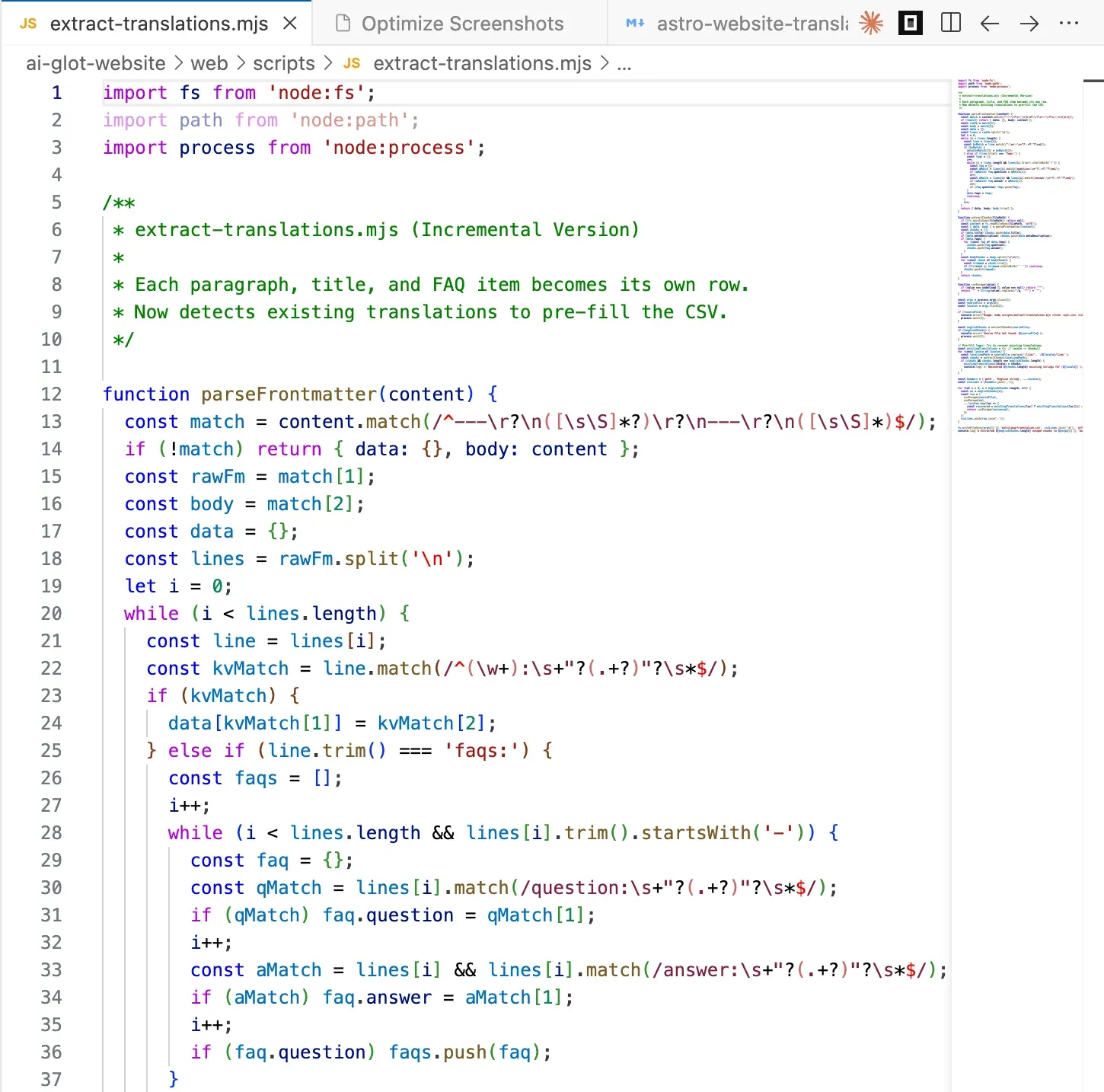
This is where most teams get stuck. The translation itself is the easy part. Getting your content into and out of a translation tool without breaking structure is the hard part.
The trick that makes this work well in AI Glot is chunked extraction. You split each markdown file into the smallest meaningful translatable units (a frontmatter field, an FAQ pair, a single paragraph), write each chunk as one row in a CSV, and add one column per target language. The result looks like this:
| path | English string | fr | de | es | it | pt |
|---|---|---|---|---|---|---|
| live/my-first-post.md | How to translate an Astro website at scale into many languages | |||||
| live/my-first-post.md | A practical, copy-paste tutorial for shipping a multilingual Astro site. | |||||
| live/my-first-post.md | Astro renders static HTML by default, which means each localized page is just a file on disk. |
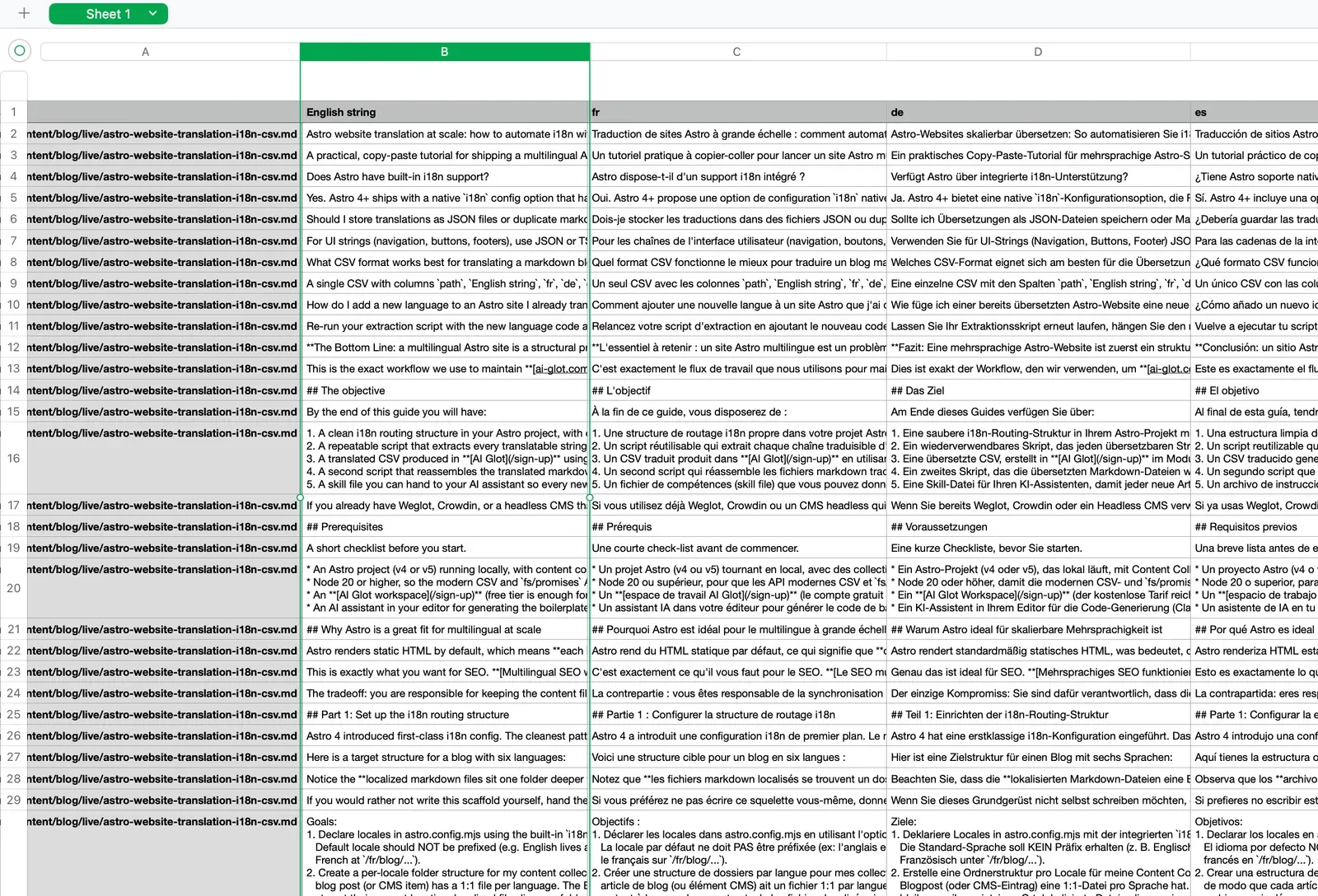
Why chunked? Because AI translation works far better on coherent paragraph-sized units than on whole documents. Glossary rules apply consistently, token budgets stay predictable, and if one chunk needs a fix, you edit one cell, not a 2,000-word file.
Option A: You store content as markdown files (blog, docs, landing pages)
Use this prompt to generate an extraction script tailored to your repo. We use a near-identical version for the AI Glot website.
Write a Node.js script at `scripts/extract-translations.mjs` that prepares a
CSV for bulk translation in AI Glot.
Inputs:
- A source directory containing English markdown files
(e.g. `src/content/blog/live/`).
- A list of target locale codes (e.g. `fr de es it pt`).
- An output CSV path (default `multilang-translation.csv`).
For each markdown file:
1. Parse the frontmatter using `gray-matter`.
2. Extract these translatable strings, one per CSV row:
- `title` (frontmatter)
- `metaDescription` (frontmatter)
- For each entry in `faqs`: the `question` and the `answer` as separate rows.
- Each body paragraph, splitting the markdown body on `\n\n` so paragraphs,
bullet lists, blockquotes, and headings each become one row.
3. SKIP these chunks (do not include them in the CSV):
- Pure image lines starting with `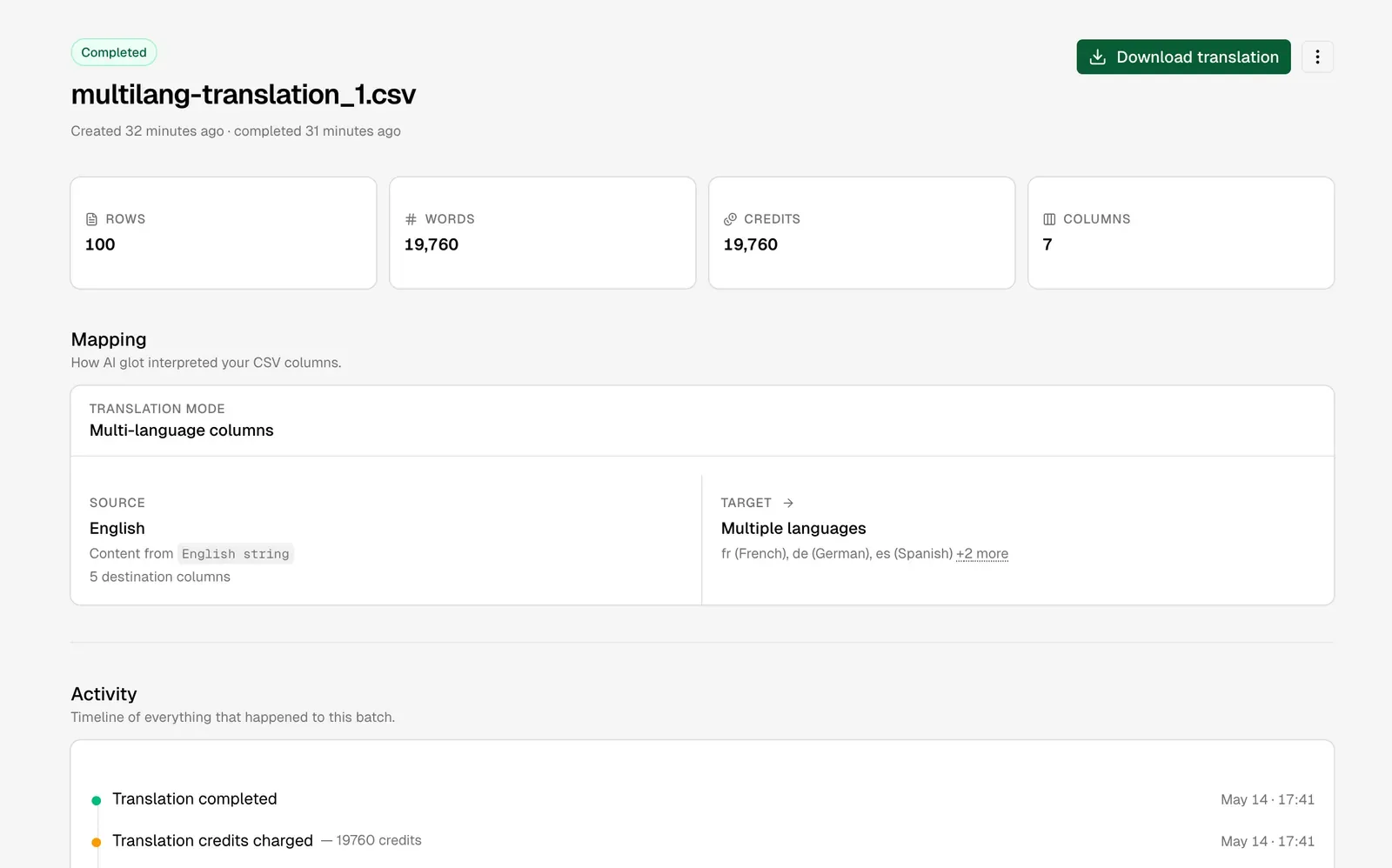
Part 4: Reassemble translated markdown back into Astro
Now you have a multilang-translation_translated.csv with every target column filled. The job is to take each translated chunk and write it back into the right localized markdown file, preserving the original structure exactly.
This is where chunked extraction pays off again. Because each row is keyed by the original English chunk, you can simply find-and-replace English chunks with their localized counterpart inside the original source file, then save the result under the localized folder. No AST parsing, no markdown round-tripping, no risk of breaking formatting.
Two structural fixes have to happen during the rebuild:
- Image paths. English files reference assets with
../../../assets/.... Localized files live one folder deeper, so the relative path becomes../../../../assets/.... - Internal links. A link like
/blog/glossary-website-translationsin English needs to become/fr/blog/glossary-website-translationsin French (and so on for every locale).
Here is the prompt we use to generate the reassembly script. It is generic enough to drop into any Astro project that follows the structure from Part 1.
Use the unified assembly script at `scripts/assemble-blog-translations.mjs` that rebuilds
localized markdown files from an AI Glot translated CSV.

Inputs (CLI args):
- Path to the translated CSV (e.g. `multilang-translation_translated.csv`)
  with columns `path, English string, fr, de, es, it, pt`.
- The source directory containing the original English markdown files
  (default `src/content/blog/live/`).
- The destination directory pattern for localized files
  (default `src/content/blog/{lang}/live/`).
- The site origin used for internal links (default `https://ai-glot.com`).

For each unique `path` value in the CSV:
1. Read the original English file from `<sourceDir>/<path>`.
2. For each target locale column (everything after `English string`):
   a. Start from the English file's full text.
   b. For every row that matches this `path`, find the `English string`
      verbatim in the file and replace it with the value in the target
      locale column. Use literal string replace, not regex. Throw if the
      English chunk is not found (it means the source drifted from the CSV;
      this should fail loudly rather than silently skip).
   c. After all replacements, run two structural fixes on the resulting text:
      - Image paths: replace every occurrence of `../../../assets/` with
        `../../../../assets/` (one extra `../` because localized files live
        one folder deeper).
      - Internal links: replace every absolute internal URL on this site
        (e.g. `https://ai-glot.com/blog/...`) and every root-relative path
        (e.g. `/blog/...`, `/sign-up`) with the locale-prefixed equivalent
        (`/fr/blog/...`, `/fr/sign-up`). Skip anchors (`#...`), external URLs,
        and `mailto:` / `tel:` links.
   d. Write the file to `<destDir resolved with this lang>/<path>`. Create
      directories as needed.
3. After processing all paths, print a summary: files written per locale,
   total replacements, any chunks that could not be found.

Robustness:
- Use `papaparse` to read the CSV. Trim BOM if present.
- Preserve the exact frontmatter formatting (delimiters, key order, quoting).
  The simplest way is to do replacements on the raw file string, not on a
  parsed AST.
- Be idempotent: running the script twice on the same inputs produces the
  same outputs.

Make it a single self-contained file. Usage:
`node scripts/assemble-blog-translations.mjs translated.csv`
Run the script and you will see a wave of new files appear under src/content/blog/fr/live/, src/content/blog/de/live/, and so on. Spot-check one, run astro dev, and your localized routes should render on the spot.
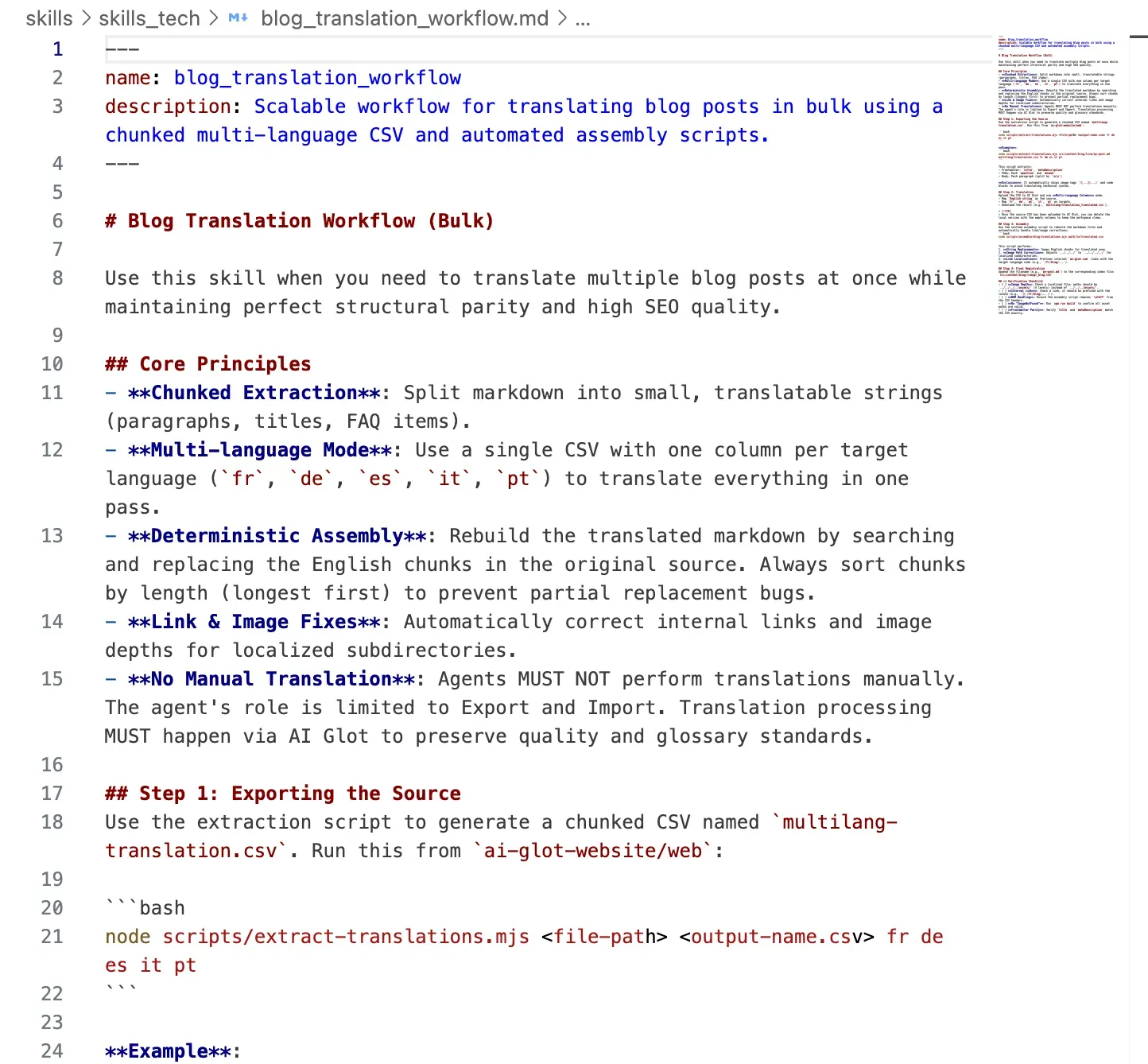
Bonus 1: A skill file so every new article is “translatable-by-default”
Once the pipeline works, you want every future article to flow through it the same way. The trick: store the convention as a skill file your AI assistant reads before writing any new post.
If you use Claude Code, Cursor, or any AI editor that loads project-level instructions, drop this file into your repo as skills/blog_translation_workflow.md. We use this exact pattern at AI Glot.
---
name: blog_translation_workflow
description: How to ship a new blog post so it can be translated in bulk later.
---

# Blog translation workflow

When writing a new blog post or CMS item, follow these conventions so it
flows cleanly through the multilingual extraction pipeline.

## 1. File location and naming
- Drafts live under `src/content/blog/draft/`.
- Slug = filename = the same string used in `slug:` frontmatter.
- Move to `src/content/blog/live/` only after review.

## 2. Frontmatter contract
Every post MUST have:
- `title`: sentence case, no trailing period.
- `metaDescription`: 140 to 160 characters, full sentence.
- `coverImage`: relative path from this file's location.
- `publishedDate`: ISO date.
- `slug`: matches the filename.
- `faqs`: array of `{ question, answer }`. Minimum 3 items.

## 3. Body structure that translates well
- Use sentence-case headings (no Title Case).
- Keep paragraphs to 1 to 4 sentences. Each paragraph becomes one CSV row,
  so shorter paragraphs translate more reliably.
- Never put two images back to back; always separate them with at least one
  paragraph of explanatory text.
- Internal links use root-relative paths (`/blog/...`, `/sign-up`).
- Image paths use `../../../assets/...` (English depth).

## 4. After publishing
Run:
```bash
node scripts/extract-translations.mjs src/content/blog/live/`<slug>`.md \
  multilang-translation.csv fr de es it pt
```
to append this article's translatable chunks to the master CSV. Upload the
CSV to AI Glot and ask it to fill every language column, then run:
```bash
node scripts/assemble-blog-translations.mjs multilang-translation_translated.csv
```
to generate the localized markdown files.

## 5. Anti-patterns
- Do NOT use em-dashes; use commas or colons.
- Do NOT bold entire paragraphs. Bold key phrases only.
- Do NOT skip an FAQ section; FAQs are among the highest-value SEO blocks.
- Do NOT inline raw HTML inside markdown unless absolutely necessary;
  it complicates chunk-based reassembly.
The next time you (or anyone on your team) writes a new article, the assistant reads this file first and produces a post that fits the pipeline without manual cleanup.
Bonus 2: Adding a new language to your entire blog in a single batch
This is the part that surprises people the most. Once the pipeline exists, adding a new language is a one-CSV operation across your entire blog archive.
Say you have 80 articles translated into French, German, Spanish, Italian, and Portuguese, and you decide to add Dutch.
The workflow:
- Re-run your extraction script with
nlappended to the locale list. Because the script reads from the English source folder, every article (old and new) is included. - Open the CSV. The
English stringcolumn is identical to last time. Thefr, de, es, it, ptcolumns are still empty (the script does not look at existing translations; it just builds the empty matrix). Thenlcolumn is new and empty. - Trim the columns you do not need to retranslate. Delete
fr, de, es, it, ptfrom the spreadsheet, keeppath, English string, nl. - Upload to AI Glot and ask it to translate
English stringintonlonly. - Run the reassembly script with the new CSV. It writes every article into
src/content/blog/nl/live/.
You went from “we need to add Dutch” to “Dutch is shipped” in one upload. For 80 articles. That is what it looks like when the workflow does the work, not the team.
The same pattern works for one-off changes: edit a single English paragraph, re-export only the affected chunks, translate them, and rebuild. Updates stay cheap because the pipeline is structural, not document-based.
Verification checklist
Before you push to production, sanity-check every locale:
npm run build(orastro build) succeeds with noImageNotFounderrors.- Hover the language switcher on a localized post and confirm the URL stays clean.
- Open a French post and spot-check: title, meta description, first three paragraphs, an FAQ answer. Compare against the source.
- Click an internal link inside the French post. It should take you to another French page, not back to English.
- Inspect the
<head>for properhreflangannotations across all locales. - Run a Lighthouse audit on one localized URL; SEO should score the same as the English equivalent.
If any of these fail, the most common culprits are: wrong image path depth, an internal link that escaped the regex, or a chunk that drifted between extraction and reassembly. The reassembly script’s “could not find chunk” warnings tell you exactly where to look.
The takeaway
Treating a multilingual Astro site as a content pipeline, rather than a one-off translation project, is what makes it maintainable. Get the pipeline right (locale routing, chunked CSV extraction, AI Glot translation, deterministic reassembly) and translating a new article, fixing a paragraph, or adding a new language becomes a routine operation instead of a quarterly initiative.
The pieces that make it work:
- Astro’s built-in i18n for clean per-locale static pages.
- A small extraction script that turns markdown into a translatable CSV.
- AI Glot’s CSV translation, told in one sentence to fill every language column in one pass, with glossary and instruction control.
- A reassembly script that handles image depth and internal link localization.
- A skill file so every new article fits the pipeline by default.
Ready to ship multilingual? Sign up to AI Glot, upload your first extraction CSV, and watch your blog go live in six languages by the end of the afternoon.